Open the bot
Tap Start, accept the terms and complete a short introduction.
Track expenses in Telegram, stay on top of your budget, and share it with the people close to you. See the whole picture in one place.
Start in a familiar chat. Open the dashboard when you need the bigger picture.
SEE IT FOR YOURSELF
Pick a purchase and see how it appears in your budget. Add as many as you like.
This is a demo: no data is sent or saved.
Pick a purchase and it will appear here ↖
EASY TO MAKE A HABIT
From your first purchase to a monthly overview.
At your own pace.
Tap Start, accept the terms and complete a short introduction.
For example, “coffee 250”. The bot will suggest a category or ask you to choose one.
Open a report in the chat or a detailed dashboard in your browser.
YOUR BUDGET IN ONE PLACE
Everyday purchases, family plans and payments that are easy to forget.
Manage a budget with family or friends. Personal entries stay in your personal ledger.
Category limits, alerts and reports for your chosen period.
Subscriptions, rent and other payments on a recurring schedule.
Record purchases in their original currency. See totals in your ledger’s currency.
Import PDF/CSV statements in the dashboard and export transactions to Excel or CSV.
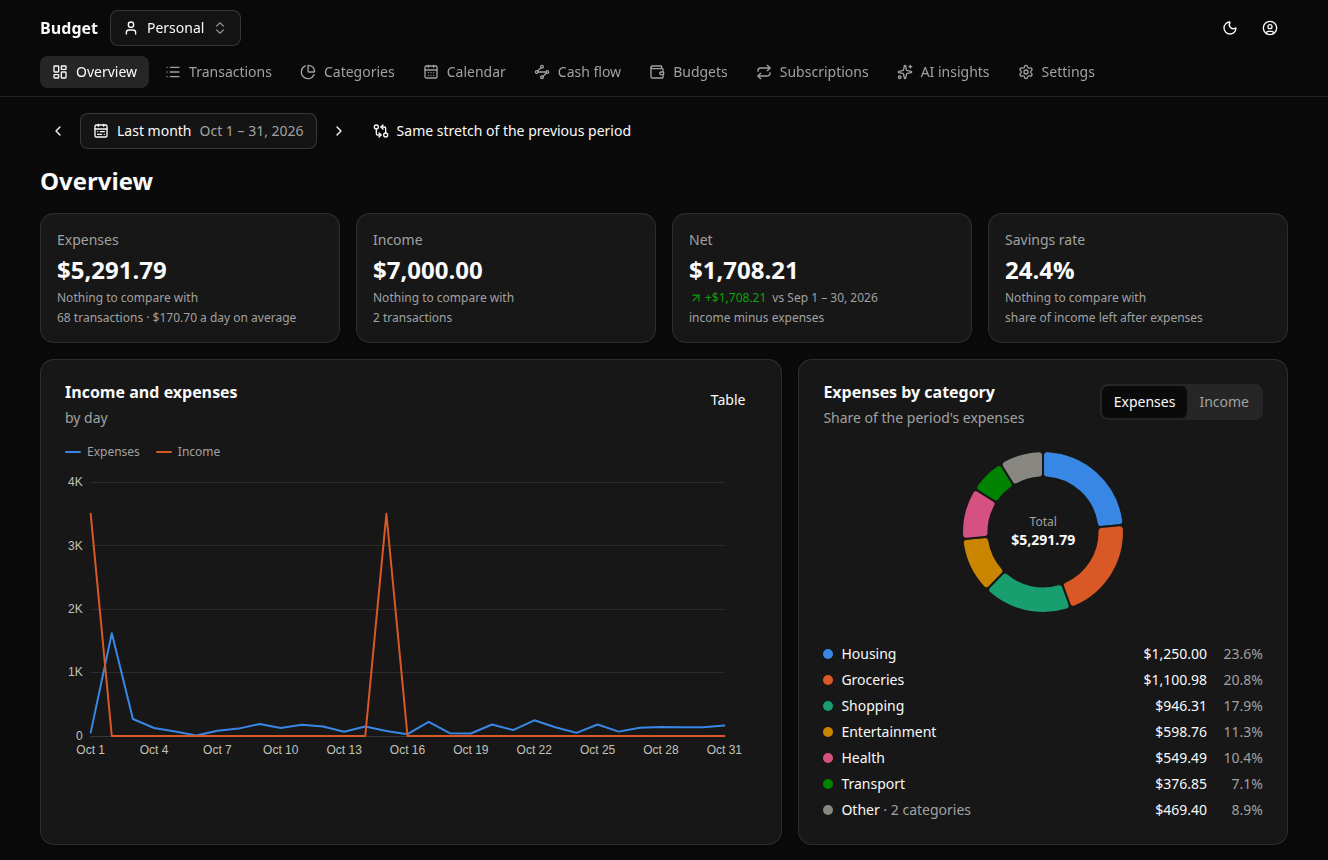
CHAT FOR ENTRIES. WEB FOR THE BIG PICTURE.
Need the details? Open the dashboard to filter transactions, view charts and explore expenses by category.
U Budget interface with sample dataBEFORE YOU GET STARTED
No. You record transactions yourself or upload a supported statement in the dashboard. Access to your bank account is not required.
Send /dashboard to the bot and open the link it sends. The link is
single-use; request a new one if it expires. If you already have a session, select
“Open dashboard”.
Yes. Create a shared ledger and invite others. Members can see entries in that ledger according to their role. Your personal ledger stays separate.
Personal entries are available to you; shared entries are available to ledger members according to their role. The service owner technically has access to the server. See the privacy policy for storage and processing details.
Yes. /export exports transactions, and
/delete_account deletes your account after confirmation. Inactive
accounts are deleted after 180 days, with advance warnings from the bot. Backup
retention periods are described in the privacy policy.
The service is still evolving, so interruptions and changes are possible. Registrations are limited. If the bot does not respond or let you in, use Feedback to contact the developer.
START WITH ONE PURCHASE
Get back to living your life.